Inquiry
Form loading...

How to Choose a UV Flatbed Printer in 2026?

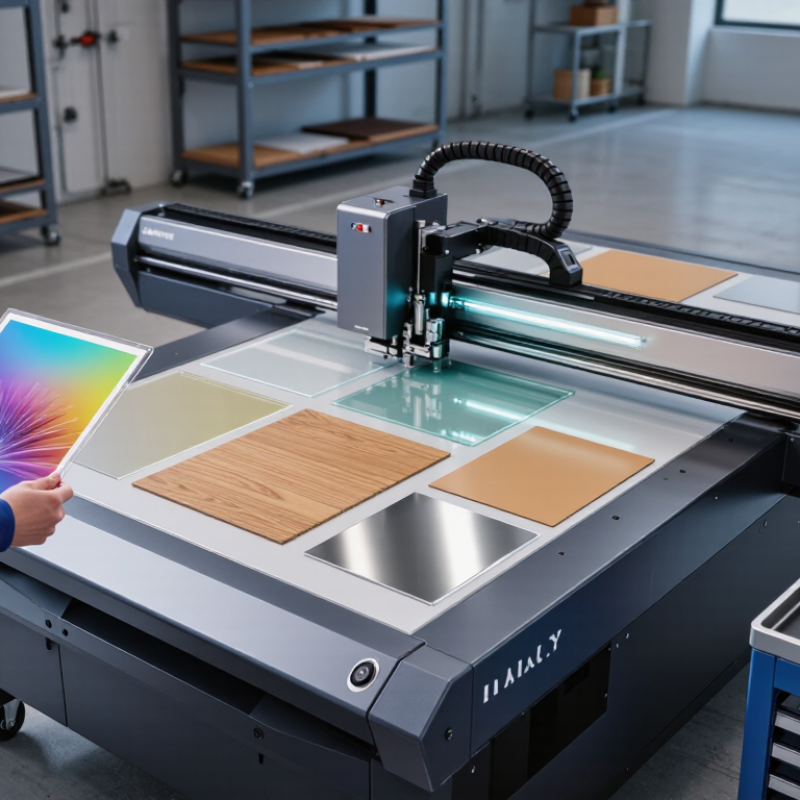
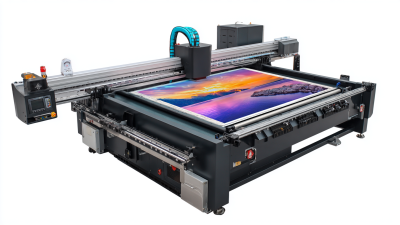
Choosing a Uv Flatbed Printer in 2026 requires more than comparing speed, price, or advertised resolution. A reliable decision begins with the materials, artwork, production volume, and workspace conditions. Acrylic sheets, wood panels, glass, leather, and coated metal can behave very differently under UV ink. A printer that performs beautifully on rigid PVC may produce weak adhesion on glass. Real samples matter.

Experience shows that print quality depends on the entire workflow. Examine the printhead brand, UV curing system, vacuum table, white-ink circulation, and software compatibility. Ask suppliers for detailed maintenance schedules and service response times. Inspect a finished sample under normal lighting, then check small text, gradients, edges, and raised effects closely. Tiny defects become expensive when production scales.

Do not trust specifications alone.

In 2026, energy use, automation, and operator safety also deserve careful attention. Look for dependable calibration tools, stable ink supply, accessible replacement parts, and documented training. An independent warranty is valuable, but local technical support may matter more during a weekend breakdown. The cheapest option can become costly through downtime, wasted boards, and repeated cleaning.

Some recommendations remain imperfect. No machine suits every business, and emerging features may lack long-term service records. Therefore, compare verified user feedback with controlled test prints, not promotional claims. This guide explains how to evaluate performance, ownership costs, substrate flexibility, and after-sales reliability before selecting a UV flatbed printer for practical 2026 production.
How to Choose a UV Flatbed Printer in 2026?

Define Output Needs: Board Size, Throughput, and 600–1200 dpi Resolution

Choosing a UV flatbed printer starts with your actual output, not a brochure specification. Measure the largest board you regularly print, including margins and registration space. A 4-by-8-foot sheet needs a bed that handles it comfortably. Tight clearance can cause loading errors and damaged edges. Smaller work may not justify a large table.

Throughput also needs a realistic calculation. Record how many boards your team prepares, prints, and unloads during one shift. Compare that figure with the printer’s sustained production rate, not its fastest demonstration speed. File preparation, ink curing, cleaning, and operator movement all reduce output. Ask for a timed sample using your material and artwork. Numbers alone can mislead.

Resolution between 600 and 1200 dpi should match the viewing distance and detail level. Use 600 dpi for many signs, panels, and bold graphics. Choose 1200 dpi when small text, thin lines, or close viewing demand sharper edges. Higher resolution can increase processing time and ink use. Test both settings on a real board. Inspect tiny lettering under normal lighting, not only on a monitor. I once favored maximum resolution and regretted the slower queue. That was a useful mistake. Also check dot placement, banding, and color consistency across the full bed. Request documented maintenance procedures, calibration records, and repeatable test results before purchasing.

How to Choose a UV Flatbed Printer in 2026? — Define Output Needs: Board Size, Throughput, and 600–1200 dpi Resolution

Match the printer configuration to the largest substrate, daily production volume, image detail, and required workflow flexibility.

Workload Profile Typical Applications Recommended Board Area Practical Throughput Target Suggested Resolution Substrate Thickness Range Selection Considerations
Sample and short-run production Personalized décor, prototypes, small signs, product samples, and specialty gifts Up to approximately 600 × 900 mm About 5–25 m² per hour, depending on ink coverage, print mode, and curing settings 600–720 dpi for general graphics and text Up to approximately 50 mm Prioritize compact installation, accurate registration, variable-data support, and low setup time over maximum production speed.
Sign and display production Retail signs, rigid panels, exhibition graphics, wayfinding boards, and interior décor Approximately 1200 × 2500 mm About 20–50 m² per hour for standard production modes 720–900 dpi for detailed text, logos, and images Up to approximately 50–100 mm Choose a bed that accommodates common sheet sizes with minimal trimming. White ink and varnish can expand application options but may reduce effective throughput.
High-volume board printing Commercial signage, furniture panels, packaging mock-ups, and repeated production orders Approximately 1600 × 3200 mm or larger About 40–100 m² per hour in fast production modes 600–900 dpi when speed is more important than fine photographic detail Up to approximately 50–100 mm, subject to machine design Focus on vacuum-zone control, automated media handling, stable head alignment, and a workflow that supports loading and unloading without excessive downtime.
Fine-detail graphics and décor Photographic décor, premium interior panels, art reproductions, and close-view graphics Approximately 1200 × 2400 mm About 10–35 m² per hour at detail-oriented settings 900–1200 dpi for small text, gradients, and close viewing distances Commonly up to approximately 50 mm Confirm dot placement, grayscale capability, color management, and banding control. Higher nominal resolution does not automatically guarantee better output without suitable media and calibration.
Mixed-material production Wood, acrylic, glass, metal sheets, PVC, foam board, coated materials, and promotional products Approximately 1200 × 2500 mm About 15–50 m² per hour, varying by material and ink layers 600–900 dpi for most commercial applications Approximately 3–100 mm, depending on the printer's clearance Verify material adhesion, surface pretreatment requirements, vacuum compatibility, table flatness, and the availability of material-specific curing profiles.
Oversized rigid-sheet production Large wall panels, architectural graphics, transportation displays, and construction-related boards Approximately 2000 × 3000 mm or larger About 30–80 m² per hour in production modes 600–900 dpi for graphics viewed from normal distance Approximately 10–100 mm, depending on the bed and gantry clearance Confirm building access, floor loading, sheet-loading equipment, vacuum performance across the full bed, and the actual maximum printable area rather than the nominal table size.

Throughput figures are practical planning ranges rather than guaranteed output. Actual performance depends on print width, pass count, ink coverage, white or clear ink layers, substrate preparation, curing requirements, operator loading time, and the selected print mode.
Compare UV-LED Curing at the Industry-Standard 395 nm Wavelength

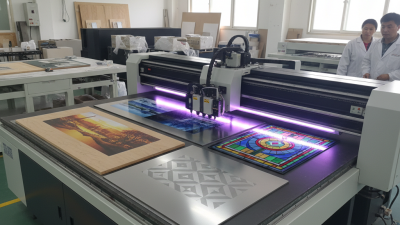
When choosing a UV flatbed printer in 2026, inspect its UV-LED curing system closely. The industry-standard 395 nm wavelength offers stable curing for many UV inks and supports detailed printing on rigid materials. However, wavelength alone does not guarantee reliable results. Check the lamp’s irradiance, curing distance, cooling design, and adjustable power settings. A strong LED array can cure dense colors faster, while poor heat control may damage sensitive boards.

In practical testing, print solid black areas, fine text, and layered white ink. Then rub the surface gently after curing. It should resist smearing and show consistent adhesion. I once trusted a specification sheet too quickly. The sample looked dry, but thick white areas remained slightly soft. That experience changed my approach: measure actual curing performance, not just advertised wattage. Ask for test prints using your materials. Wood, acrylic, glass, and coated metal can react differently.

Tips: Confirm that the ink is designed for 395 nm UV-LED curing. Request a curing test at production speed, not only at the slowest setting. Examine the printed surface under angled light for gloss changes or uncured patches. Also check whether the printer records lamp power and maintenance intervals. These details improve repeatability, although no setting removes the need for regular calibration and operator judgment.

Test Media Adhesion with ASTM D3359 Before Approving Ink Sets

How to Choose a UV Flatbed Printer in 2026?

A reliable printer should prove adhesion on your actual media, not only on sample boards. Before approving an ink set, print solid blocks, fine text, and dark layered areas. Let the samples condition for 24 hours at stable room temperature. Then apply an ASTM D3359 cross-cut or X-cut test, depending on the surface and coating structure. Use a sharp, calibrated cutter and suitable adhesion tape. After pulling the tape at a consistent angle, rate the result from 0B to 5B. A clean 5B result is encouraging, but it is not a complete production guarantee.

Tips: Test each substrate separately. PVC, acrylic, aluminum composite, glass, and coated wood can behave very differently. Keep records of surface cleaning, print settings, lamp exposure, and environmental conditions. Photograph the cut grid before and after tape removal. Repeat the test after abrasion, moisture exposure, or outdoor aging when the application demands it. Small failures often appear at edges or in heavily inked areas.

ASTM D3359 provides a disciplined comparison, but it has limits. Its methods were not created for every digital print surface or flexible material. Therefore, combine the rating with bending, rubbing, and real handling trials. I have seen attractive samples pass immediately, then lose small letters during installation. That result deserves investigation, not excuses. A printer choice becomes stronger when the test method matches the customer’s real workflow.

Model TCO Using Ink Consumption, Energy Use, and Service-Interval Data

How to Choose a UV Flatbed Printer in 2026?

Model total cost of ownership before comparing purchase prices. Ink often becomes the largest variable expense. Record ink consumption per square meter, using real production files rather than empty test patterns. Dark images, white ink, and heavy coverage can change the result sharply. Ask for measured consumption data, not optimistic estimates.

Energy use also deserves practical measurement. Note standby power, printing power, and curing power during a typical eight-hour shift. A meter beside the printer gives better evidence than a brochure. Service intervals matter too. Compare scheduled cleaning, filter replacement, printhead checks, and expected downtime. My first estimate once ignored maintenance labor. It looked efficient, but the weekly cleaning time changed the calculation.

Tips: Build a three-year spreadsheet. Include ink, electricity, labor, waste, spare parts, and service visits. Use your local electricity rate and average monthly output. Request sample prints with your own artwork. Small details matter. Check whether service data comes from continuous production or short demonstrations. A printer with lower ink use may still cost more if calibration takes longer. Leave a contingency line for unexpected repairs; real workshops are rarely perfect. Recheck the model after thirty production days, because early assumptions can be misleading.

Audit Operator Safety Under IEC 62471 and Service Quality Under ISO 9001

How to Choose a UV Flatbed Printer in 2026?

Audit Operator Safety Under IEC 62471 and Service Quality Under ISO 9001

A UV flatbed printer should be assessed beyond speed, resolution, and purchase price. Operator safety deserves direct inspection. IEC 62471 evaluates photobiological risks from optical radiation, including ultraviolet exposure. Ask whether the printer has enclosed curing areas, effective interlocks, warning labels, and documented emission testing. Measure the light. Do not rely only on a sales description.

Watch the machine during a real print cycle. Check whether doors close securely and lamps stop when access panels open. Operators should receive clear training, suitable protective equipment, and practical instructions for abnormal situations. A clean workshop helps, but it does not replace engineering controls. One weakness often appears here: teams inspect the printer, yet overlook reflected radiation from nearby surfaces.

Service quality should be examined under ISO 9001 principles. Request documented installation steps, technician qualifications, maintenance schedules, response targets, and corrective-action records. Reliable support should leave an evidence trail. Keep records. Ask how recurring faults are analyzed, not merely repaired. A supplier may promise rapid service, but vague escalation procedures create downtime. The audit should include spare-parts availability, software updates, remote-support controls, and post-service verification. The checklist is useful, though imperfect; operator feedback may reveal problems that formal records miss. Ask harder questions.

How to Choose a UV Flatbed Printer in 2026?

Audit operator safety under IEC 62471 and service quality under ISO 9001

The chart shows an illustrative procurement weighting for a UV flatbed printer audit. IEC 62471 focuses on photobiological safety and risk assessment, while ISO 9001 supports documented processes, corrective actions, maintenance control and continual improvement. The percentages are buyer-evaluation weights, not certification scores.